


What Is WordPress Site Profiling? Complete Overview

Did you know that over 43 percent of all websites run on WordPress? This immense popularity makes WordPress an attractive target for tech analysts, marketers, and security experts. Many people think that site profiling is just a fancy word for hacking, but that’s far from the truth. By collecting detailed information about plugins, themes, and site architecture, experts can uncover patterns and gain powerful insights into how websites are built and managed.
Key Takeaways
| Point | Details |
|---|---|
| WordPress Site Profiling | A legitimate data analysis technique that provides insights into plugins, themes, and security vulnerabilities without unethical practices. |
| Profiling Methods | Utilizes various techniques like browser extensions, network inspection, and source code scanning to reveal comprehensive website information. |
| Applications | Used for security audits, performance optimization, competitive analysis, and lead generation, enhancing strategic decision-making. |
| Legal Considerations | Requires adherence to ethical practices and compliance with data protection laws to avoid privacy violations and unauthorized information gathering. |
Table of Contents
- Defining WordPress Site Profiling And Misconceptions
- Types Of WordPress Profiling Methods And Tools
- How Plugin And Theme Detection Works
- Common Applications: Audits, Outreach, Market Analysis
- Risks, Legal Boundaries, And Compliance Issues
Defining WordPress Site Profiling and Misconceptions
WordPress site profiling is a sophisticated data analysis technique that goes beyond simple website inspection. Site profiling involves systematically collecting and analyzing comprehensive information about a WordPress website’s technical architecture, revealing intricate details about its plugins, themes, configurations, and underlying infrastructure. According to research in information science, this process constructs detailed user profiles by extracting patterns and correlations from exposed digital data.
Contrary to common misconceptions, WordPress site profiling isn’t about invasive hacking or unauthorized access. Instead, it’s a legitimate analytical method used by professionals to understand website ecosystems. Developers, marketers, and researchers leverage site profiling to gain insights into technological trends, competitive landscapes, and potential optimization strategies. Read more about WordPress technology detection tools to understand how these techniques work in practice.
Site profiling typically reveals critical information such as:
- Active WordPress plugins and their versions
- Theme details and customization layers
- Performance configurations
- Potential security vulnerabilities
- Third-party integrations and service connections
Professionals use these insights for various strategic purposes, including competitive analysis, lead generation, security assessments, and technological trend tracking. By understanding a website’s technical DNA, experts can make informed decisions about development, marketing, and technological investments.
Types of WordPress Profiling Methods and Tools
WordPress site profiling encompasses several sophisticated techniques and tools designed to extract comprehensive digital intelligence. Deep fingerprinting represents the most advanced method, which involves analyzing multiple technical signatures across a website’s infrastructure. According to research from WP Detector, this approach examines CSS signatures, JavaScript patterns, HTML markers, and server responses to reveal intricate details about a site’s technological ecosystem.
Professionals utilize different profiling approaches, each targeting specific aspects of WordPress websites. Explore advanced WordPress technology comparison tools to understand the nuanced methodologies. The primary profiling methods include:
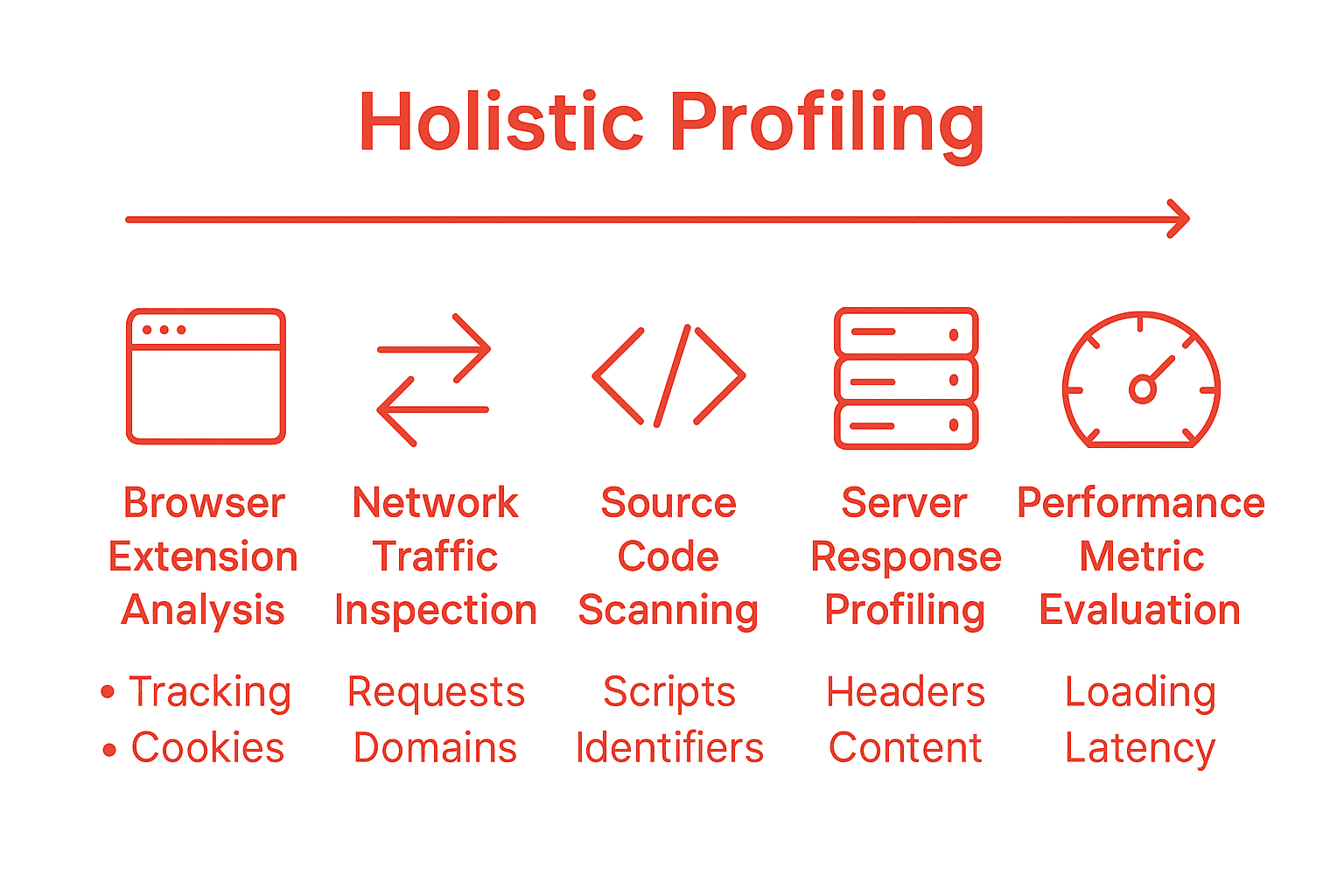
- Browser Extension Analysis: Instant website technology detection through browser plugins
- Network Traffic Inspection: Examining HTTP/HTTPS requests and response headers
- Source Code Scanning: Parsing HTML, CSS, and JavaScript for technological markers
- Server Response Profiling: Analyzing server headers, PHP versions, and configuration details
- Performance Metric Evaluation: Assessing load times, plugin impact, and optimization levels
These profiling methods collectively provide a holistic view of a WordPress site’s technical DNA. Security researchers, marketers, and developers leverage these insights to understand website architectures, identify potential vulnerabilities, track technological trends, and make strategic digital decisions. By combining multiple detection techniques, professionals can build comprehensive profiles that reveal not just surface-level information, but deep technological insights.

Here’s a comparison of common WordPress profiling methods:
| Profiling Method | Key Techniques | Typical Insights Uncovered |
|---|---|---|
| Browser Extension Analysis | Technology detection plugins | Active plugins Themes Main tech stack |
| Network Traffic Inspection | HTTP/HTTPS header review | Server details CDN usage Security config |
| Source Code Scanning | HTML & CSS marker analysis | Theme name Plugin traces JS libraries |
| Server Response Profiling | HTTP header & PHP version checks | Hosting setup Framework versions |
| Performance Metric Evaluation | Load time testing Script evaluation |
Plugin impact Optimization opportunities |
How Plugin and Theme Detection Works
Theme and plugin detection is a sophisticated digital forensics process that goes far beyond simple surface-level scanning. According to research from WordPress detection experts, this technique leverages multi-layered fingerprinting to uncover intricate technological details about websites. The process involves deep examination of code patterns, HTML markers, CSS and JavaScript signatures, and comprehensive server responses.
The detection mechanism operates through several intricate steps. Learn more about WordPress technology tracking to understand the nuanced approach. Profiling tools systematically analyze different layers of a website’s architecture, including:
- Unique code signatures embedded within plugin files
- Specific HTML structure and meta tags
- JavaScript library versions and configurations
- CSS class names and styling patterns
- Server header information and response characteristics
What makes this detection method powerful is its ability to identify technologies even on highly customized WordPress sites. By cross-referencing multiple technical indicators, these tools can detect not just the presence of a plugin or theme, but also its specific version, configuration details, and potential customizations. This comprehensive approach allows professionals to gain unprecedented insights into a website’s technological ecosystem, enabling strategic decisions in development, marketing, and competitive analysis.
Common Applications: Audits, Outreach, Market Analysis
WordPress site profiling has transformed from a niche technical practice into a strategic tool across multiple professional domains. According to research from WP Detector, these sophisticated analysis techniques provide invaluable insights for developers, agencies, security professionals, and marketers seeking comprehensive technological intelligence about digital ecosystems.
Read about competitive WordPress technology analysis to understand the practical applications of site profiling. The primary applications span several critical business and technical domains:
- Security Auditing: Identifying potential vulnerabilities, outdated plugins, and risky configurations
- Performance Optimization: Analyzing site technology stacks for potential performance bottlenecks
- Competitive Intelligence: Mapping technological trends and competitive digital strategies
- Lead Generation: Discovering potential clients based on specific technological requirements
- Technical Sales Prospecting: Understanding website architectures for targeted outreach
Professionals leverage site profiling to make data-driven decisions that go beyond surface-level observations. By systematically mapping a website’s technological DNA, experts can uncover hidden opportunities, mitigate potential risks, and develop more targeted, intelligent strategies across marketing, development, and strategic planning domains. The ability to rapidly decode a site’s underlying technologies provides an unprecedented competitive advantage in today’s complex digital landscape.
Risks, Legal Boundaries, and Compliance Issues
WordPress site profiling occupies a complex legal and ethical landscape where technological exploration intersects with privacy considerations. According to research in information science, profiling techniques raise significant concerns about potential misuse, social sorting, and unauthorized data collection that could infringe on intellectual property rights and individual privacy expectations.
Explore WordPress technology detection guidelines to understand the nuanced legal boundaries. The primary ethical and legal risks associated with site profiling include:
- Data Privacy Violations: Potentially collecting sensitive website configuration details without explicit consent
- Intellectual Property Concerns: Risk of inappropriate use of discovered technological information
- Competitive Intelligence Boundaries: Navigating the thin line between research and industrial espionage
- Unauthorized Information Gathering: Potential legal challenges related to scraping and data extraction
- Compliance with Regional Regulations: Ensuring profiling methods align with international data protection laws
Responsible professionals must implement strict ethical guidelines and technical safeguards when conducting site profiling. This involves transparent methodologies, respecting robots.txt directives, avoiding intrusive scanning techniques, and ensuring that all collected information is used solely for legitimate, professional purposes. The key is maintaining a balance between technological curiosity and fundamental principles of digital ethics and privacy protection.
Unlock the Full Potential of WordPress Site Profiling with Accurate Insights
If you have ever struggled to truly understand a competitor’s WordPress stack or felt uncertain about hidden vulnerabilities, you know how critical clarity and accuracy are in making smart decisions. The challenges of plugin and theme detection, performance bottlenecks, or even legal compliance can make audits and outreach feel overwhelming. But what if you had a trusted, precise solution that cuts through the digital noise and delivers real, actionable WordPress intelligence?

WPoptic is purpose-built to reveal the exact technical DNA of any WordPress site, helping you confidently identify active plugins, custom themes, performance configurations, and potential security issues. You can automate lead research, conduct thorough competitive analyses, or launch highly targeted marketing right from your browser. Visit WPoptic to tie your strategy directly to hard data and make every project a step ahead of the curve. The WordPress ecosystem moves fast. Don’t let your next audit or campaign wait. Try out WPoptic today and gain a professional advantage that matters most when timing, accuracy, and expertise are everything.
Frequently Asked Questions
What is WordPress site profiling?
WordPress site profiling is a data analysis technique that involves systematically collecting and analyzing comprehensive information about a WordPress website’s technical architecture, revealing details about its plugins, themes, configurations, and infrastructure.
How does theme and plugin detection work in WordPress profiling?
Theme and plugin detection involves multi-layered fingerprinting, where tools analyze code patterns, HTML structures, CSS, and JavaScript signatures, along with server responses to uncover detailed technological information about a website.
What are the main applications of WordPress site profiling?
WordPress site profiling is used for security auditing, performance optimization, competitive intelligence, lead generation, and technical sales prospecting, helping professionals make informed decisions based on a website’s technological insights.
What are the legal and ethical considerations of WordPress site profiling?
Evaluating WordPress site profiling involves understanding potential risks related to data privacy violations, intellectual property concerns, and compliance with regulations. Professionals must use ethical guidelines to ensure responsible data collection and analysis practices.