


WordPress plugin detector

Detect
WordPress plugins
on websites

See what plugins are installed on any WordPress site.

Free Browser extension

WPoptic is available direct in your browser

Download WPoptic for free from the Chrome, Edge or Brave extension webstore, showing results in seconds when checking a website. Information that is shown inside the browser extension are:

100% Accuracy

Is what we strive for at WPoptic. These tests reveal that.

Plugin detector test

WPoptic plugin detector detects the most plugins on avarege, is the fastest and has the best accuracy based on this test.

Theme detector test

WPoptic finds 100% of the themes in this test. With an avarage speed of 2 seconds the results are the fastests.

WordPress plugin insights

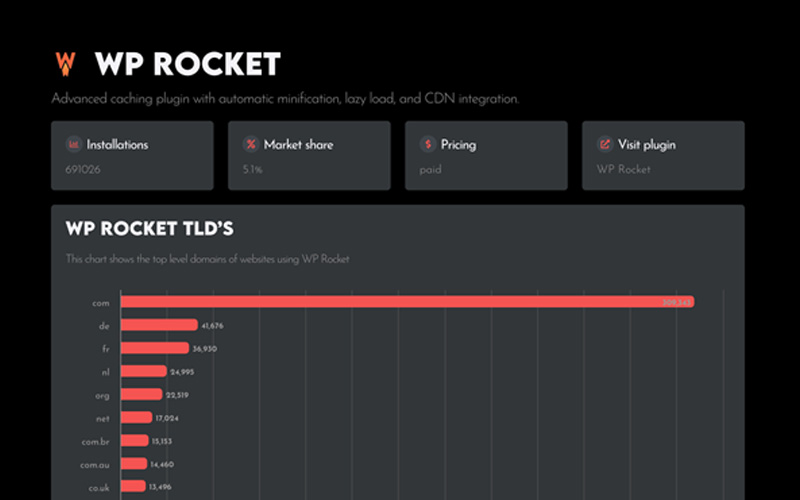
On our plugin pages we share unique insights we found in our database. Check out where a plugin is popular, what websites are using the WordPress plugin and much more.

WordPress category info

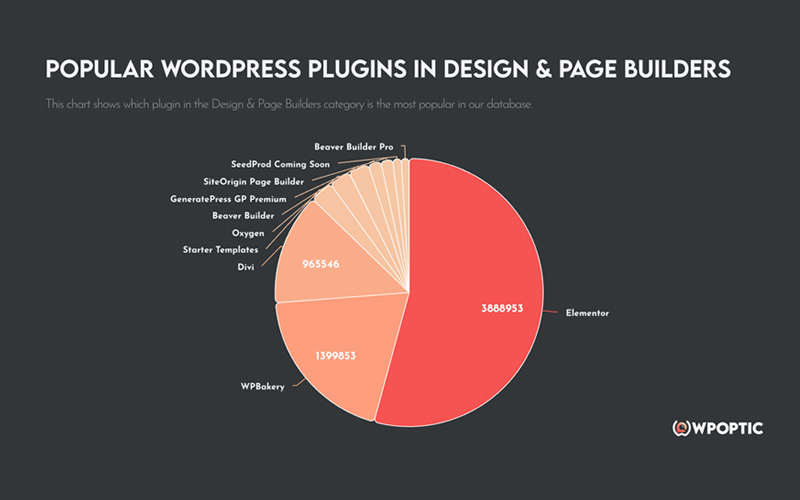
What WordPress plugin is the most popular in their category, what are other solutions and more information you will find on our WordPress category pages.

Most popular WordPress plugins

In recent months, WPoptic has detected over 17,000 unique WordPress plugins a total of 48,540,435 times across 13,630,481 websites.

These are the most popular WordPress plugins in their category.

Trusted by WordPress Enthousiasts

These people love WPoptic,
test it for yourself and detect every WordPress plugin and theme on site.

Joost de valk
Joost de valkYoast SEO
Sounds fun. Would love to see it in action.

Michelle Frechette
Michelle FrechettePost Status
WPoptic is fast, blazing fast. Holy cow!
Kostas Karakoglou
Kostas Karakoglou
Such a life saver.! Thank you
Aurelio Volle
Aurelio VolleWP Umbrella
Looks like a great tool!
Johirul Islam
Johirul Islam
Great extension. It can detect the WordPress plugins so fast. I just love it.

Syed Balkhi
Syed BalkhiWPbeginner
Sure would love to test it 🙂
Yonathan Evan
Yonathan Evan
More helpful than wappalyzer as it's focused on WordPress site.
Bright Blue Gum
Bright Blue Gum
It's relatively accurate and incredibly fast. I suppose that eventually it will display versions too.
Vlas Bashynskyi
Vlas Bashynskyi
Cool extension!

FAQ WordPress plugin Detection

WPoptic is a professional WordPress plugin detection tool that identifies plugins and themes used on any WordPress website. With a comprehensive database of over 30,000 plugin signatures, WPoptic delivers accurate detection results instantly and completely free of charge.

WPoptic scans the website’s HTML, script calls, style sheets, and unique plugin fingerprints. It checks these against our growing database of plugin signatures. The detector works instantly in your browser, so you don’t need to install anything on the target website. Or use the website scan on this website

Yes, WPoptic is completely free with no usage limitations. You can detect plugins on as many WordPress websites as you need without any subscription fees or hidden costs. However, if you would like to lists of websites using a specific plugin. Then check out our lead lists

We track plugin names, versions, authors, URLs, premium markers, and usage frequency across all scanned sites. The data is extremely accurate because every detection is validated against our signature library. We continuously improve these signatures, so the accuracy grows automatically as more users scan websites.

Absolutely. WPoptic stores every detection in a central database. This allows you to generate lists like “websites using Rank Math,” “websites using Elementor,” or “sites running WooCommerce.” You can later filter, sort, or export these lists for prospecting, competitor research, or plugin analysis.

New detections flow into WPoptic every day through the Browser extension. We update plugin signatures, versions, and metadata continuously. This keeps the database fresh and ensures new or updated plugins get recognized quickly. Our database is updated each quarter. 

Most of the time, yes. Even with aggressive caching, plugins still leave traces in the markup or assets. For headless WordPress or extremely custom builds, detection may be limited, but WPoptic still attempts to follow asset paths and script patterns that reveal hidden plugins.

Yes. WPoptic supports exporting in multiple formats so you can use the data in your CRM, spreadsheets, or presentations. Perfect for agencies doing audits, plugin developers researching markets, or freelancers creating reports for clients.

With the free Chrome extension, you can scan as many sites as you want. But our extension has a limiter so people don’t use it for bulk data extraction. If you need any type of WordPress list, please check out our lead-list function.

Yes. WPoptic aggregates detections from all scans to show you which plugins are rising in popularity. This makes it ideal for plugin developers, marketers, and agencies. You can spot trends early and adjust your strategy based on real usage data.

Create WordPress leadlists

The data of WPoptic is accurate, secure and optimised for your purposes.

WPoptic ROI Calculator

Discount applied: 0%

Total lead list cost:0,00

Expected revenue:0,00

WordPress Data,
Into Clarity

Or login with